
Picking an SEO plugin can feel like choosing between two “must-have” tools that promise the same result: better rankings.
In reality, Yoast SEO and RankMath are both capable. The better choice depends on what you value most: simplicity and guidance, or flexibility and advanced controls.
If you run a small business WordPress site in Cheshire (or nearby, like Chester, Warrington, Crewe, Northwich, Macclesfield, or across into Merseyside and Greater Manchester), the “best” plugin is the one you will actually configure properly, keep tidy, and use consistently to support local lead generation.
Yoast SEO vs RankMath: the quick verdict
Here’s the practical way to think about it.
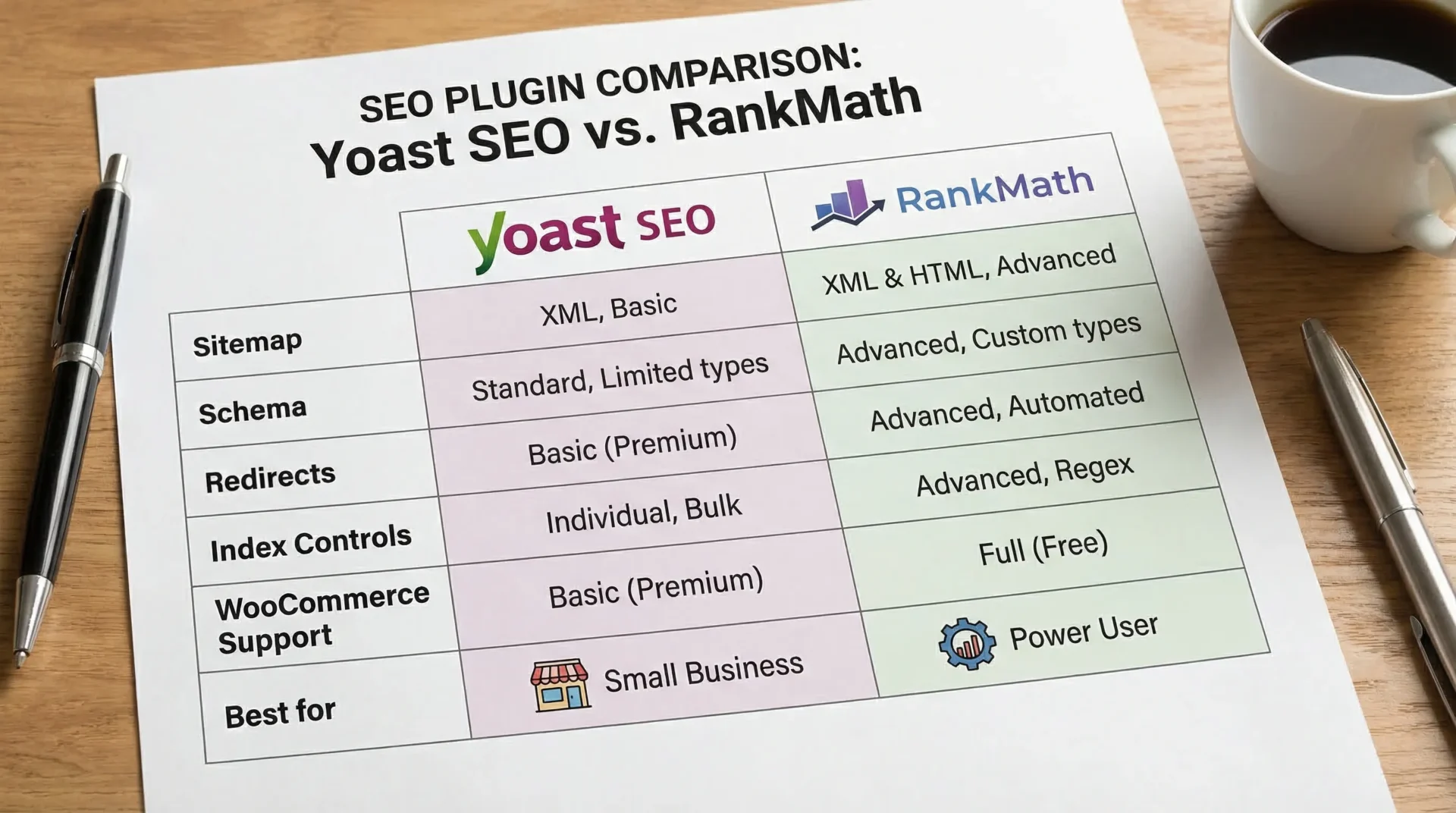
| If you want… | Choose… | Why |
|---|---|---|
| The most beginner-friendly workflow and writing guidance | Yoast SEO | It’s opinionated, consistent, and strong at keeping things simple. |
| More built-in features and granular control (especially in the free plugin) | RankMath | It tends to expose more settings and modules, which power users love. |
| A “set sensible defaults and don’t touch it weekly” approach for a brochure site | Yoast SEO | Less temptation to over-configure. |
| A plugin that can grow with more complex SEO needs on the same site | RankMath | More toggles, more schema options, more technical levers in one place. |
Both can help you implement best practices like titles, meta descriptions, indexation rules, canonical URLs, XML sitemaps and schema. Neither will replace the fundamentals: solid pages, strong local signals, and technical health.
What an SEO plugin can (and can’t) do for rankings
An SEO plugin mainly helps WordPress output cleaner signals for search engines and helps you avoid common mistakes.
An SEO plugin can typically help you:
- Edit page titles and meta descriptions at scale
- Control what gets indexed (categories, tags, author archives, thin pages)
- Generate XML sitemaps
- Add structured data (schema)
- Handle redirects (depending on plugin and plan)
An SEO plugin cannot automatically:
- Make a slow site fast
- Fix poor site structure or weak internal linking
- Create local trust (reviews, citations, local links)
- Replace a technical audit
Google is very clear that good SEO starts with making pages easy to crawl, understand, and useful for people. The plugin is just one piece of that, see Google Search Central’s SEO starter guidance.
Setup experience: which is easier for non-SEOs?
Yoast SEO setup
Yoast’s setup flow is widely liked because it nudges you toward sensible defaults. If you’re a new site owner, that guidance matters.
Where Yoast often wins:
- Clear, straightforward settings
- Excellent “guard rails” that reduce the risk of accidental misconfiguration
- Simple content checks that don’t overwhelm
RankMath setup
RankMath’s wizard is also user-friendly, but it exposes more options early. That can be a benefit if you know what you’re doing, or if you’re working with an SEO who wants control.
Where RankMath often wins:
- More granular toggles and modules
- Easy connections to extra features without adding multiple plugins
Cheshire small business reality check: If you are busy running the business, “simple and consistent” often beats “powerful but fiddly”. Most ranking drops we see from WordPress sites are not because the plugin was “worse”, they happen because settings drift, pages get accidentally noindexed, or templates output messy titles.
On-page optimisation: content analysis and writing support
Both plugins provide “traffic light” style feedback for pages and posts. Treat this as guidance, not a scoring system.
Yoast’s content analysis
Yoast’s readability and SEO checks are one of its strongest selling points for non-SEOs. It pushes you toward:
- Clear headings
- Reasonable paragraph length
- Using related phrases naturally
- Adding internal links
RankMath’s content analysis
RankMath’s analysis can feel more “checklist-driven”, and it often provides more individual items to tick off.
Our view: If you publish blog content regularly (services, FAQs, guides), Yoast’s writing feedback can be easier to work with. If you prefer a more technical checklist, RankMath can be appealing.
Technical controls that matter most (indexing, canonicals, sitemaps)
This is the area that most business owners underestimate, because it is invisible until it breaks.
At minimum, whichever plugin you choose should help you:
- Generate an XML sitemap and keep it clean
- Prevent thin or duplicate sections of the site being indexed
- Output correct canonical tags
- Manage how archives (tags, categories, authors) behave
If you are unsure whether your site has technical issues holding it back, this is exactly where a proper review helps. SEO plugins are not a substitute for a real technical review, they’re the control panel. If you want a specialist check, see SEO Bridge’s Technical SEO service.
Schema and rich results: who does it better?
Schema is how you help search engines understand entities on the page (organisation, services, FAQs, reviews, products, breadcrumbs). It can support enhanced results when eligible, see Google’s structured data documentation.
In practice:
- Yoast is strong at implementing a consistent schema framework with sensible defaults.
- RankMath is often preferred by SEOs who want more schema types and more customisation from within the plugin.
Important: Adding schema does not guarantee rich results. It needs to match visible content and Google’s eligibility rules.
Redirects and 404 handling (a common local SEO pain point)
When you change URLs (or rebuild a site), redirects matter a lot. Broken pages waste crawl budget, lose link equity, and frustrate customers.
- Yoast: Redirect management is commonly associated with its premium offering.
- RankMath: Redirect tools are often available as part of its feature set (depending on the version you’re using).
If your site has had multiple edits over the years (very common for local trades and service businesses), redirects are one of the fastest “hidden wins” to tackle.
Performance and “plugin bloat”: what to watch
Neither plugin automatically makes your site slow, but both can contribute to complexity.
What actually causes issues:
- Enabling modules you don’t use
- Adding overlapping plugins (two schema plugins, two sitemap generators, multiple redirection tools)
- Heavy themes and page builders combined with lots of add-ons
Rule of thumb: Use one SEO plugin, keep its modules lean, and avoid stacking multiple plugins that do the same job.
WooCommerce and local e-commerce sites
If you sell online and rely on product visibility, you’ll care more about:
- Product schema
- Breadcrumbs
- Category indexing strategy
- Canonicals for product variants
Both plugins can handle WooCommerce SEO basics, but the “better” option depends on how customised your store is and whether you need advanced schema control.
If your setup is more complex than a typical small shop, it can be worth getting broader technical and systems advice as well, not just WordPress SEO. For mid-market businesses combining SEO with automation, integration, or ERP-driven ecommerce operations, a partner like DataOngoing’s AI and NetSuite consulting team can help align marketing performance with back-office systems.
Which plugin is better for local businesses in Cheshire?
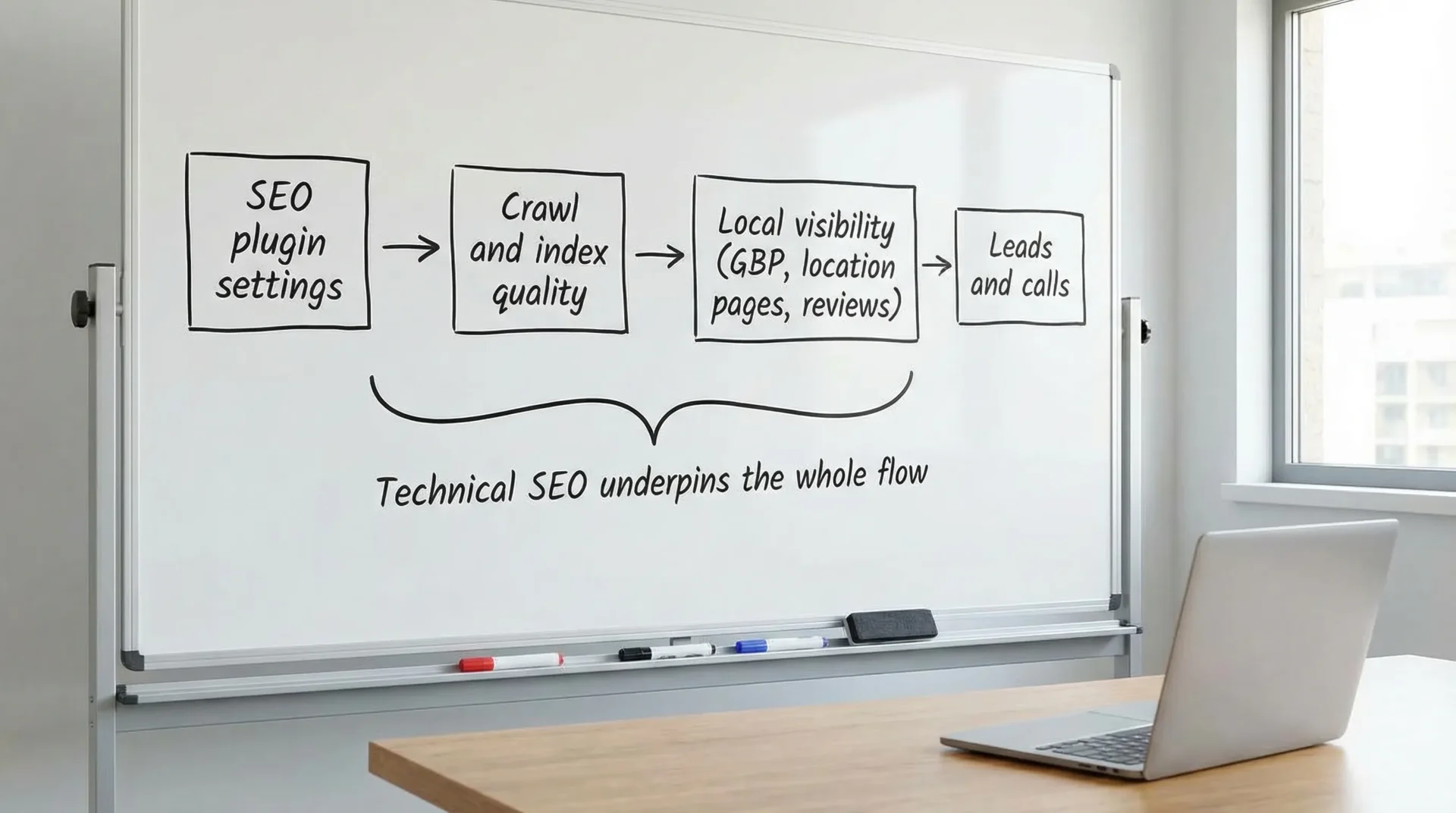
If your primary goal is more local enquiries, the plugin decision is less important than getting these four things right:
-
Your key service pages are strong (clear offer, areas served, proof, calls to action).
-
Google Business Profile is fully optimised (services, categories, photos, regular posts, and consistent NAP).
-
Your site is technically sound (indexing, speed, mobile usability, clean internal linking).
-
You build local trust (reviews, citations, local links, case studies).
If you’re currently focused on the “getting found” basics, you’ll get a lot of value from these guides on the SEO Bridge blog:
- How To Get My Business On Google (great starting point)
- Local SEO Services: How to Get More Calls in Cheshire (lead-focused)
A practical decision framework (no jargon)
Use this if you want a confident choice in under 10 minutes.
Choose Yoast SEO if…
You want a plugin that encourages best practice without turning your dashboard into an aircraft cockpit.
Yoast is a strong fit when:
- You are new to SEO
- You publish content and want writing guidance
- You want fewer settings to manage
- Your priority is consistency over customisation
Choose RankMath if…
You want more control and are comfortable learning what each option does.
RankMath is a strong fit when:
- You (or your SEO) want granular technical toggles
- You like controlling schema types per page
- You’re migrating from another SEO plugin and want more built-in features
If you already have one installed
In most cases, do not switch just because someone says the other one is “better”.
Switching plugins can be worth it if:
- You are missing a capability you genuinely need
- Your current setup is messy and you want a clean rebuild
- You have technical support to handle migration safely
If you suspect your visibility issue is not plugin-related (it often isn’t), read: Why Your Website Isn’t Showing Up on Google (And How to Fix It).
The configuration checklist that matters (for either plugin)
This is where most WordPress SEO wins are made.
Indexing rules (avoid thin pages appearing in Google)
Make sure you are not indexing pages that add little value, for example:
- Tag archives nobody uses
- Duplicate author archives (especially on single-author sites)
- Internal search result pages
- Utility pages (thank-you pages, admin pages)
Sitemap and Search Console connection
- Ensure your XML sitemap is generated and includes only index-worthy URLs.
- Submit the sitemap in Google Search Console.
Titles and meta descriptions (templates first)
Instead of editing every page manually, set sensible templates for:
- Homepage
- Service pages
- Blog posts
- Location pages (if you have them)
Schema basics
At minimum, confirm you have:
- Organisation schema (or LocalBusiness where appropriate)
- Breadcrumbs (if your theme supports them)
- Article schema for posts
Internal linking
Most small business WordPress sites in Cheshire are missing internal links that guide users to enquire.
A simple approach:
- Link from blog posts to the relevant service page
- Link between related services (for example, “Web Design” to “SEO”)
- Add a “related services” block on core pages
Do not let the plugin distract you from site speed and crawlability
If pages are slow, blocked, or broken, content improvements will underperform.
This is where a technical audit pays off, because it looks beyond the SEO plugin to hosting, theme, Core Web Vitals, JavaScript issues, redirect chains, canonical mistakes, and indexation quality. SEO Bridge covers this as part of Technical SEO.
Common mistakes we see with Yoast and RankMath (and how to avoid them)
Mistake 1: Chasing green scores instead of leads
A “perfect” score does not guarantee the page matches real search intent. For service businesses, clarity wins.
Mistake 2: Indexing everything
More pages indexed does not mean more rankings. Often it means more duplicate content and weaker overall quality signals.
Mistake 3: Multiple SEO plugins at once
This can cause conflicting titles, duplicate schema, multiple sitemaps, and unexpected noindex behaviour.
Mistake 4: Forgetting local proof
If you want to win searches like “electrician in Chester” or “accountant in Nantwich”, you need strong local trust signals (reviews, case studies, citations). The plugin cannot create those.
Final recommendation
- If you want the simplest, most guided experience, choose Yoast SEO.
- If you want more control and more built-in capability, choose RankMath.
But the best move for most small businesses is not debating plugins for weeks. Pick one, configure it properly, and then focus on what actually moves the needle: technical health, service pages that convert, and local trust.
Frequently Asked Questions
Is RankMath better than Yoast SEO for WordPress? It depends on your priorities. RankMath tends to offer more granular features and controls, while Yoast tends to be simpler and more guided for non-SEOs.
Will switching from Yoast to RankMath improve my rankings? Not automatically. Rankings typically improve when switching is paired with better technical setup, cleaner indexation, improved content, and stronger authority, not just a plugin change.
Do I need an SEO plugin at all? For most WordPress sites, yes. An SEO plugin makes it much easier to manage titles, meta descriptions, canonicals, sitemaps, and indexation rules without custom development.
Which plugin is best for local SEO in Cheshire? Either can work for local SEO. The bigger factors are your Google Business Profile, location and service pages, reviews, local links, and a technically sound website.
Can an SEO plugin fix technical SEO issues? It can help you control some technical signals (like canonicals and sitemaps), but it will not fix deeper issues like Core Web Vitals problems, crawl traps, JavaScript rendering issues, or poor architecture. That usually needs a technical audit.
Want a second opinion on your WordPress SEO setup?
If you’re not sure whether your site’s issue is plugin configuration, technical SEO, or local visibility, a quick audit can save weeks of guesswork. Take a look at Shall We Audit Your Website? and see what a structured review could uncover for your site.
